Interview with Frederik Hessels | Senior account manager
"We now spend 200 hours less each year processing quotations"
Logic Vision helps companies both in the Netherlands and abroad to optimize their business processes with the Microsoft Dynamics 365 Business Central ERP package. It’s been doing this for almost 25 years, with a team of 45 people in Hardinxveld-Giessendam. Senior account manager Frederik Hessels knows where Logic Vision’s strengths lie: “We work mainly for maritime, oil and gas, and manufacturing companies, and have added functionalities to the package especially for these industries.”

Needless amount of work on quotations
In his role as senior account manager, Frederik acquires new customers and helps existing customer accounts grow. In both cases, quotations are essential to decision-making by customers. But the process of drawing up those quotations left a lot to be desired, Frederik thought: “We used to make our quotations in Word and print them out. Then they had to be signed internally by two people. Once we had the signatures, we scanned the quotations, printed them on letterhead, and posted them to the
customer.”
“Scanning meant that our prospects and existing customers were getting these hard-to-read quotations”
Setting a good example
The complicated quotation process was bad enough, and the unprofessional look of the quotations themselves made things even worse. Frederik: “Scanning meant that our prospects and existing customers were getting these hard-to-read quotations.” It was time for a faster and better-looking solution, Frederik and his colleagues thought: “We always preach that you have to automate, so of course we have to set a good example ourselves.”

“Logic Vision soon started using DocuFlow for HR documents such as employment contracts.”
Time for a smarter solution
Frederik went in search of a better solution for producing the quotations, including digital signing: “At first I thought about DocuSign, but I didn’t get a good first impression of it. Through QBS Group, I came into contact with Documizers and discovered DocuFlow. I knew right away that this was what I was looking for.” Logic Vision has been working with DocuFlow since February 16, 2021, and Frederik noticed results already in the first year: “We send out around 200 quotations a year. We now save one hour of labor on every quote. So that’s at least 200 hours every year, not to mention the time quotations spend lying around on desks waiting to be signed.”
Gains in terms of look & feel and time saved
Frederik looks with satisfaction at the new way of working and the results it’s yielding: “We now have a good template for our documents. We save time, ink and paper. Our customers also save, as they no longer need to print out the documents or sign them manually. Our documents look great, and I have the feeling that it is easier to sign our quotations as a result.”
“I have the feeling that it is now easier to sign our quotations”
Mapping the new document process
Logic Vision uses Microsoft Dynamics CRM to record contact details and contracts, among other things. Within the CRM, the documents are prepared in Microsoft Word and PDF and sent via Outlook. Logic Vision also uses DocuFlow’s digital signing.
Quotations
- DocuFlow retrieves the data needed for the quotation in Microsoft Dynamics.
- It creates the quotation in Word.
- Quotations are first signed internally by members of the management team.
- DocuFlow sends the quotation via Outlook and saves the document with the signatures of internal
signatories. - The prospect or existing customer gets the quotation, signs it digitally, and gets confirmation.
- Logic Vision receives the signed quotation. DocuFlow stores it permanently in SharePoint and sends an email notification to Sales and the management team.
HR documents
- The document in question is prepared by HR in Word.
- The signatory’s name and email address are included in the Word document via DocuFlow, and the document is then sent to the new or existing employee via Outlook.
- The employee receives an email with a link to the contract.
- DocuFlow saves the contract as ‘not yet signed’.
- The employee views the contract in a secure environment.
- The employee signs it digitally and gets confirmation.
- The contract is signed and emailed to HR so that it can be stored in a secure environment.
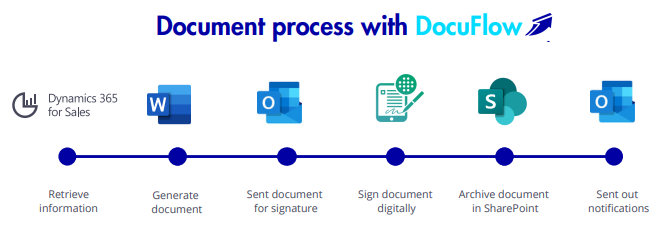
Microsoft Dynamics CRM and DocuFlow
Frederik can confirm that DocuFlow works well with Microsoft: “They work really very well together. The whole process is now largely automated. We can still customize our emails with additional agreements, terms and conditions and project documentation. We now have highly sleek quotations that we and our customers can sign easily. This is also ideal when we’re on the road or working from home.”
It’s with good reason that Frederik now also advises his customers to use DocuFlow: “I’m an ambassador. My customers also often have approval flows for which DocuFlow is very useful. The implementation is smooth, and it took us only two days to complete it. It’s very easy to work with right from the get-go.”
"The implementation is smooth, and it took us only two days to complete it. It’s very easy to work with right from the get-go."
About Logic Vision
As a certified Microsoft Gold Partner, Logic Vision supports organizations that use Microsoft Dynamics 365 Business Central in optimizing business processes. The team consists of 45 subject specialists. Logic Vision is located in Hardinxveld-Giessendam.
Everything You Need to Know About DocuFlow
Download the brochure. It provides a detailed explanation of all DocuFlow functionalities.


More information at alistar.net/nl
Documizers versimpelt documentprocessen met DocuFlow.
DocuFlow is an online platform that automatically generates and processes documents and emails. The application streamlines all your document-related activities into a single document workflow and connects the associated applications. As a result, creating, sending, digitally signing, and archiving documents such as contracts, quotations, and purchase orders becomes effortless.
DocuFlow also offers benefits such as:
- Professionalization of communication workflows;
- Standardization and a consistent way of working;
- Prevention of (human) errors;
- Insight into document workflows;
- Centralized management of templates, processes, and documents.